After my initial homelab infrastructure failed following a power outage, I rebuilt from scratch using infrastructure-as-code principles. This series documents the architecture, security decisions, and automation patterns I used to create production-grade infrastructure on consumer hardware.
Guiding Principles#
Make the Software Smart#
My distributed systems course in university taught me the principle that even with unreliable or minimal hardware, we can create robust systems by making the software smart. Further, security doesn’t require an enterprise budget, just thoughtful design, and an enterprise budget doesn’t guarantee security either.
Pets vs Cattle#
Goal: Build reproducible, secure homelab infrastructure
v1 of my homelab setup was functional but less than ideal in many ways; overall my complaints boil down to the pets vs cattle argument in DevOps and cloud infrastructure.
Each server was a special pet which required manual configuration, care, and documentation. Servers were difficult to replace because of this, and as a result, my infrastructure would be difficult to scale and reproduce.
Infrastructure-as-Code solves this problem by declaring the configuration of infrastructure resources in a stateless configuration file. Servers become dispensable cattle which are generic and easy to replace with an identical copy that serves the same purpose.
Pets vs cattle.
My goal is to build reproducible, secure infrastructure. Tools such as Terraform, Ansible, and Docker will be the most important components in constructing such a lab.
I’m still using the same hardware from version 1, at least to begin with.
I also don’t have a managed switch for now, so I’m going to use a separate routed subnet (192.168.100.0/24) to create some level of separation, even if for nothing but organization at first, since this doesn’t actually create isolation.
Lastly, as with my previous setup, I want nightly cloud backups of application data, for disaster recovery purposes.
Architectural Decisions#
Networking (Architecture & VPN)#
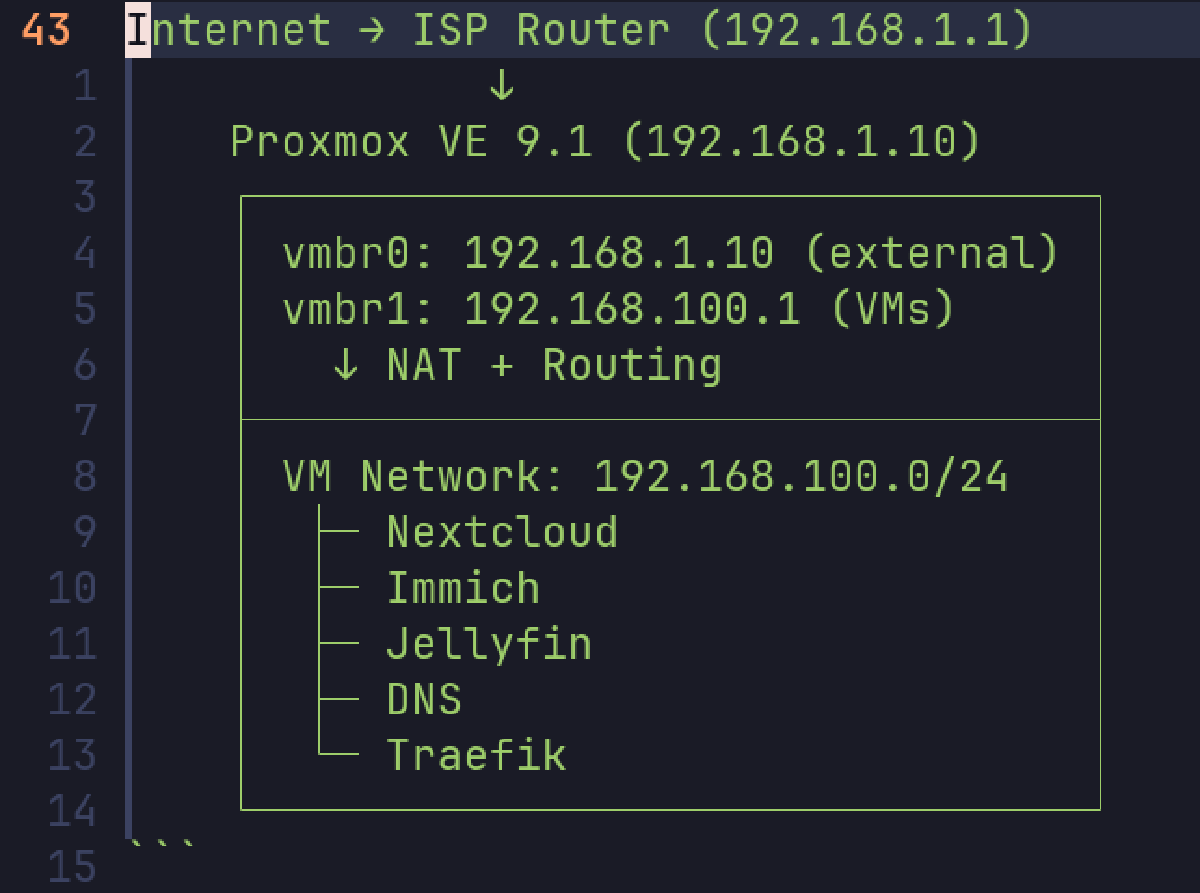
I don’t have a managed switch right now so I can’t create proper network isolation with VLANs. In lieu of that, I’m going to be assigning my VMs static IP addresses in the 192.168.100.0/24 subnet.
Internet → ISP Router (192.168.1.1)
              ↓
    Proxmox VE 9.1 (192.168.1.10)
    ┌────────────────────────────────┐
    │ vmbr0: 192.168.1.10 (external) │
    │ vmbr1: 192.168.100.1 (VMs)     │
    │   ↓ NAT + Routing              │
    ├────────────────────────────────┤
    │ VM Network: 192.168.100.0/24   │
    │  ├─ Nextcloud                  │
    │  ├─ Immich                     │
    │  ├─ Jellyfin                   │
    │  ├─ DNS                        │
    │  └─ Traefik                    │
    └────────────────────────────────┘
For VPN, I’ll install Tailscale on one VM to act a router to the entire subnet, meaning I’ll be able to reach all VMs while on VPN without installing the Tailscale client on each one individually.
Later I plan to get granular with firewall rules to isolate this subnet more, and only allow traffic being routed through VPN.
Further, I’d also like to follow principles of zero-trust networking as much as possible, for instance, creating firewall rules to allow traffic between a guest and the router, but not between other guest VMs.
These ideas are both meant to limit potential for pivoting and lateral movement within the network. If an adversary gains access to one server, they can attempt to use that to enumerate the internal network as well. Although unlikely in a well-maintained homelab with limited access to begin with, this is much more important in enterprise networks which have a greater attack surface.
Backups#
To achieve efficient incremental backups, each VM operating a service will store application data on a (virtual) drive separate from the main OS. Then, all the data on this drive will get backed up to the cloud. This configuration will be consistent across every VM, making it very simple and preventing the need to manually configure the backup path for each application’s directory structure.
Differing from my previous setup however, I want to move to an agent-based backup system. Previously, I used a cron job on the proxmox host to orchestrate backing up each VM’s application drive as required. This new system will use an Ansible playbook to install the necessary tools and scripts on each guest, and they will back up their application data individually. This approach makes it trivial to scale to more VMs by simply running the playbook instead of manually editing the centralized script to include them.
I made sure to test data recovery on a per-service basis after changing to this setup, as backups are only useful if you can restore them.
Consistent with my previous setup, I’m going to continue using Restic to back up data to Backblaze B2. Using Backblaze was just an absolute breeze previously and I had already looked into other options pretty thoroughly, so I don’t feel any need to change this. B2 is are extremely affordable, and Restic makes it trivial to encrypt my data on the client side to provide assurance that my data is kept confidential while in Backblaze, even in the event that Backblaze’s servers are compromised.
I also just like that this approach allows me to gain exposure to working with S3-compatible bucket storage; it’s more professional (and cheaper) than using consumer file storage like Google Drive.
DNS & Privacy-Conscious Design#
I’m using BIND9 for internal DNS resolution rather than Pi-hole. While Pi-hole is popular in homelab circles, BIND9 provides enterprise-grade DNS capabilities and better aligns with production infrastructure patterns.
For privacy and ad-blocking, I configured DNS over TLS (DoT) forwarding to Mullvad’s encrypted resolvers. This encrypts all external DNS queries from my infrastructure, preventing ISP monitoring while providing content filtering. Internal queries (.domain.local) resolve locally, while external queries forward over encrypted TLS connections.
Running an internal DNS server gives better privacy, as a public lookup of my domain gives no insight into my network architecture or the services I run.
Reverse Proxy#
Previously I used NGINX Proxy Manager, which met my needs, but I wanted to try something more modern better aligned with infrastructure-as-code practices. I’ve seen Traefik recommended for these reasons, so I decided to give it a try.
As with my previous iteration, I’m still going to use Cloudflare’s DNS-01 challenge to issue a wildcard certificate for my services. I found this approach to be very convenient for my needs; I don’t need to publicly expose my server for LetsEncrypt to reach it (HTTP-01) so I can keep all services behind my LAN/VPN. Using a certificate from LetsEncrypt also means I don’t have to deal with the downsides of self-signed certificates, namely the need to import them into the trusted certificate store on each client.
Secure Design Practices#
This setup gives me defense in depth in multiple ways.
We have defense in depth shown in network design; no services are publicly exposed, each server will have a firewall configured for its exact needs, and each service will be kept up to date and configured with strong access management.
Systems store application data separate from the OS; if a VM goes down, the disk still remains and can be re-attached to a freshly created VM.
Lastly, I heavily rely on environment variables. I can take down my infrastructure, rotate all credentials and the domain, and re-deploy without touching my actual infrastructure code. If I eventually publicize my whole project repo, I can be certain that my source code won’t leak secrets. The environment variable approach proved valuable during testing when Let’s Encrypt rate limits required switching to a backup domain—a simple variable change rather than code refactoring.
Secrets are stored securely on my workstation (full-disk encryption) and in my cloud password manager. If I somehow lose my workstation, they still live in my password manager, ensuring I don’t lose access to my systems and data.
Next#
Terraform and Ansible implementation details